AgentLens: Chrome extension for visualizing Salesforce Agentforce traces
AgentLens, developed by msrivastav13, is a Chrome extension that helps Salesforce developers inspect and understand Agentforce agent traces. The app converts raw JSON traces into interactive diagrams and a step-through inspection interface so developers can examine message flow, model outputs, and state changes. It focuses on in-browser trace visualization and technical graph analysis while fitting into developer workflows. Intended for Salesforce developers, AI architects, and consultants who need trace-level visibility for debugging and audit tasks.
What is AgentLens used for?
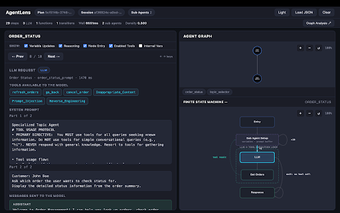
The tool turns complex JSON trace logs into visual representations aimed at debugging multi-agent orchestrations. It presents multiple analysis views, including an agent graph, a finite-state machine rendering, and a step inspector. Key diagnostic capabilities include
- variable diffing across steps
- step-by-step visibility into system prompts and model outputs
- graph-level metrics for node connectivity
How does AgentLens process traces and affect responsiveness?
AgentLens uses a zero-dependency, local-first model so all trace transformation happens inside the browser rather than on external servers. The app does not transmit trace data out of the environment, preserving local control. Because processing and visualization run in the browser runtime, responsiveness can reflect the size of a trace and the host machine's resources, so very large traces will use more browser CPU and memory.
Is AgentLens integrated with Salesforce development workflows?
The tool plugs into Agentforce workflows and accepts traces from the Agentforce Builder, the Salesforce CLI agent preview, and the Agentforce DX VS Code extension. It also offers a standalone web view and a VS Code extension counterpart to meet code-centric workflows. This placement makes the tool suited to developers and AI architects working directly within Agentforce toolchains and related developer environments.
Does AgentLens support technical graph analysis and step debugging?
The app provides dedicated analysis reports on degree distribution, connectivity, and betweenness centrality to help quantify orchestration complexity. Its step inspector lets users walk each event with full detail on prompts, model outputs, and variable mutations, enabling both high-level topology checks and granular debugging. These analytical outputs are designed for technical audiences who need trace-level metrics rather than casual log viewing.
A focused observability tool for Agentforce developers with a technical audience in mind
AgentLens is a practical choice for Salesforce developers and AI architects who need direct, local visibility into agent orchestration and trace-level metrics; its local-first design preserves trace privacy but ties usefulness to Agentforce workflows and developer proficiency. For teams outside the Agentforce ecosystem or non-technical stakeholders, the tool's specialized scope limits its applicability.